Preloading Your Deck Onto 300 Drives: Folder Structure, Read-Only Partitions and What Happens Next
Preloading is the cheapest upgrade you can make to a branded drive and the one that goes wrong most quietly. Nothing breaks: the drives arrive, the files are on them, the launch goes ahead. Both failures happen out of sight. A recipient drags your folder to the bin in week one — or, worse, keeps it, and two years later is still opening a product sheet with last year’s specifications on it, because a file on a drive has no expiry date and no way to be updated.
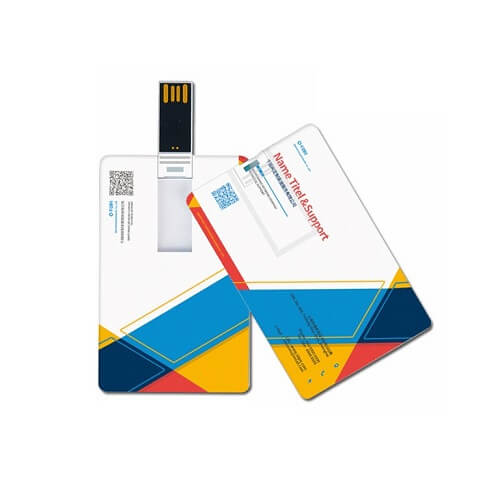
This is the practical side of shipping preloaded USB corporate drives: how loading actually happens on a production floor, the root-folder structure we hand to clients, what write protection genuinely exists versus what merely looks like it, and the governance of putting your own material into 300 pairs of hands you will never see again.
The short version
Assume the recipient will delete your files. Design the load so that deleting them is fine — one obvious entry file, a short shelf life, nothing on the drive that you would mind seeing forwarded, and a link for anything that will change. Lock the drive down only if you genuinely want it to stop being a useful gift.
What preloading actually is on the production floor
Nobody copies files onto 300 drives one at a time. A master is built exactly as the finished article should look — correct file system, volume label, folder tree and icon — then duplicated onto banks of drives at once. Three consequences follow for how you brief it.
- The master is the deliverable. Approve the master, not a description of it. Ask for a screenshot of the root folder as it will appear on a laptop, with hidden files shown. Everything you approve is what gets stamped 300 times.
- A late file change is a full re-run. Swapping one brochure after loading has started means re-imaging every drive already done. Lock your content before the master is built.
- Loading happens after branding. A drive that fails a print or engraving check should never have absorbed loading time, so decoration is checked first and loading follows.
The volume label is worth one sentence of thought. It is the name shown next to the drive icon, and the default is usually a generic manufacturer string. Ask for your company or campaign name instead — within 11 characters on a FAT32 drive, up to 15 on exFAT. It costs nothing and it is the first branding the recipient reads on screen.
Autorun is dead — plan for a human double-click
Briefs still arrive asking for the brochure to “open automatically when they plug it in”. That has not been possible on Windows for well over a decade. After a wave of malware that spread through removable media, Microsoft disabled automatic execution of a drive’s autorun instructions for non-optical removable media, backporting the change to older versions in a security update in early 2011. Modern Windows will at most show a notification. macOS never had the behaviour at all.
So the design goal is not automation, it is obviousness: when the folder window opens, the recipient must be able to tell in two seconds what to click. That is a naming and structure problem, entirely within your control.
The root-folder structure we hand to clients
This is the layout we recommend when there is more than a single file to load. It sorts predictably on both Windows and macOS, puts the entry point at the top, and survives being viewed on a machine that hides file extensions.
Drive root (volume label: your company name)

  00-Start-Here.pdf
  01-Company-Profile-2026.pdf
  02-Catalogue/
       Product-Range-A-2026.pdf
       Product-Range-B-2026.pdf
  03-Video/
       Corporate-Film-2026.mp4
  04-Specifications/
       Technical-Data-Sheets-2026.pdf
  Read-Me.txt
The rules behind it, which matter more than the exact names:
| Rule | Why |
|---|---|
| Number the top level | Alphabetical sorting is the only sorting you can rely on across machines. Numbering forces your intended reading order. |
| Seven items or fewer at the root | A crowded root window reads as clutter and gets dragged to the bin wholesale. Push depth into folders. |
| Put the year in the filename | The single cheapest piece of governance available. A file dated in its own name cannot silently become stale. |
| Hyphens, not spaces; no punctuation marks | Avoids problems when a filename is emailed, uploaded or opened on an older system. Slashes, colons, question marks, asterisks and quotation marks cause real failures. |
| One plain text file at the root | Opens on any machine with no software. Put a two-line description, your website and a contact number in it — it is the fallback when a document viewer is missing. |
| Never rely on file extensions being visible | Many machines hide them. The name alone must say what the file is. |
Write protection: three options, and only one of them is real
“Can you make it so they cannot delete our files?” is the second most common preloading question we get. The honest answer is layered, because “cannot” is doing a lot of work.
| Method | How strong it is | Effect on the rest of the drive | Worth it when |
|---|---|---|---|
| Read-only file attribute | Cosmetic. One right-click undoes it; dragging the folder to the bin ignores it entirely. | None | You only want to prevent an accidental edit-and-save over your master file |
| Read-only partition set at the factory | Genuine. Part of the memory is presented as a fixed, unwritable volume; the rest stays a normal drive. | Reduces the free space the recipient gets, by the size of the locked area | The content must survive — press kits, warranty and safety documents, licensed material |
| Whole drive locked at the factory | Absolute. Nothing can ever be written to it again. | The drive stops being storage and becomes a one-way document carrier | Almost never for a gift — it removes the reason people keep the drive |
| Physical switch on the body | Genuine while it is switched on, and the recipient controls it. | Adds a moving part to the housing; available on a small number of models only | The drive is a working tool for a technical audience |
Factory-set partitioning and locking are configured during production and are model-dependent — they cannot be added afterwards, so they have to be agreed before the sample is approved.
Our contrarian recommendation: for the overwhelming majority of corporate gifts, do not lock anything. The reason a drive outperforms a printed brochure as a gift is that the recipient keeps it and uses it, and every day it lives in their bag your logo travels with it. A locked drive is a brochure with a connector on the end. Spend the effort on making the content worth keeping instead.
The tidiness problem nobody warns you about
If the master drive is built on a Mac, macOS quietly writes its own housekeeping items: a search-index folder, a file-system events folder, a bin folder, and a companion file beginning with a dot and an underscore beside every one of your documents. On a Mac these are invisible. On a Windows machine with hidden items shown — common in engineering, government and audit environments — they all appear, and your carefully numbered root suddenly holds a dozen unexplained items. Windows adds its own system volume folder and thumbnail caches. Neither is misbehaving; both are doing what they always do.
The fix is procedural and belongs in the brief: build and verify the master on Windows, or clean the macOS companion files off before imaging, and always review the master with hidden items switched on. Ask for that screenshot — it is the difference between a drive that looks professionally prepared and one that looks like somebody’s desktop.
Governance: your material is now on 300 drives you do not control
Once the drives leave the room there is no recall, no version update and no audience list. Everything on them is permanent, copyable and forwardable — not a reason to avoid preloading, but a reason to be deliberate about what goes on.
Load what is stable. Link what will change.
Company profile, brand story, capability overview, corporate film, technical principles: stable, load them. Price lists, stock availability, event schedules, anything with a person’s direct line: unstable, leave them off. For unstable material, load a one-page document carrying a short link or code that resolves to a page you can edit — you keep control, and you get to see whether anybody used the drive at all.
Personal data does not belong on a giveaway drive
This one is worth stating plainly because it happens. Delegate lists, contact sheets and photographs of identifiable staff carry obligations under Malaysia’s Personal Data Protection Act 2010, and a few hundred uncontrolled drives is the least reversible way to distribute them. A conference drive should carry the programme, not the people.
Assume it will be forwarded
Anything on the drive can be copied and emailed within seconds. Before approving the master, ask one question of every file: if this appeared on a competitor’s desk tomorrow, would that be a problem? Ask it hardest of the material that travels inside a company deck without anyone noticing — internal costing tables, unreleased artwork, draft roadmaps and the notes pane underneath a slide.
Give the content a stated shelf life
A dated footer on every preloaded document — “Issued August 2026, current specifications at our website” — costs nothing, protects you from a two-year-old sheet being quoted back at you, and gives the recipient a reason to visit the site.
One governance note that only matters at scale: if the memory is not what the label claims, a preloaded folder sitting in the first fraction of the drive will open perfectly and prove nothing — which is why we run a full-write capacity check on the incoming batch before a single file is loaded.
Where loading sits in the production calendar
Production runs 20 to 30 working days after artwork approval, plus roughly 15 days shipping, with express at 10 working days on limited models and quantities. Preloading adds a distinct block inside that window, and the sequence matters: acceptance test on blank stock, then branding, then master build and sign-off, then imaging, then a final open-the-largest-file check on a sample.
Two realities worth planning around. Content approval is almost always the long pole — the drives are usually ready before the video is. And payload size changes the imaging block substantially, which is why we ask for file sizes at briefing; the arithmetic sits in our piece on USB 2.0 versus USB 3.x write speed.
Preloading questions we answer most often
Can the recipient delete our preloaded files?
On an ordinary drive, yes, and most eventually will — which is normal and not a failure. If particular content must survive, a factory-set read-only partition is the option that genuinely works, at the cost of some of the recipient’s free space. It has to be specified before the sample is approved.
Will our brochure open by itself when the drive is plugged in?
No. Automatic execution from removable drives was disabled by Microsoft in a security update in 2011, and macOS never supported it. Design for a clearly named entry file at the top of the folder instead — it is more reliable and it does not trigger corporate security warnings.
Can you password-protect the content?
Document-level passwords can be applied to the files before imaging, which is straightforward. Encrypting the whole drive is different: it usually needs software the recipient must run, it fails on locked-down corporate machines, and on a gift it creates more friction than protection. If material genuinely needs protecting, ask whether it belongs on a giveaway at all.
Should personal data be preloaded onto giveaway drives?
No. Delegate lists, attendee contact sheets and scanned forms carry obligations under Malaysia’s Personal Data Protection Act 2010, and a drive that has been handed out cannot be recalled or corrected. Share that material through a channel you can withdraw instead.
What is the minimum order for preloaded drives?
From 300 pcs per design, the same as an unloaded drive. Loading is a production step rather than a separate product, so it does not change the quantity — it changes the calendar. Choosing the body first also helps, since the housing decides which factory options are on the table; we cover that in our guide to metal, wood and card drive bodies.
Send us the folder, we will build the master
Give us your files, your quantity and your delivery date and we will come back with a free digital mockup, a proposed root-folder layout and a quote — usually within one business day. Minimum order from 300 pcs per design, 20 to 30 working days production after artwork approval plus about 15 days shipping, express 10 working days on limited models and quantities, delivered across Kuala Lumpur and nationwide with an SST invoice and ePerolehan-ready documentation for government buyers.
Request a free mockup for a logo USB flash drive KL project, message us on WhatsApp at +60 10 717 5924, or send the brief through our contact page.
Aquaholic Gifts Malaysia · AS80, Jalan Hang Tuah 4, Taman Salak Selatan, 57100 Kuala Lumpur · A Singapore-based corporate gifting specialist since 2003, now serving Malaysia.