Can They Actually Sign It? Board Stiffness, the Writing Surface and Clip Tension
A shaky signature is almost never the guest’s fault, and it is almost never the pen’s fault either. It is the board. Someone is standing at a counter, phone in one hand, signing with the other, pressing down on a cover that flexes a millimetre or two under the nib — and the line comes out wobbly, the ink skips where the surface dipped away, and they sign again, harder, tearing the docket.
Every venue we have ever discussed this with blamed the pen first. The pen is the cheapest thing in the equation, so it gets swapped, and nothing improves. A legible signature is an engineering outcome: it depends on how stiff the board is, what sits directly under the paper, how the docket is held, and whether the whole object can be operated with one hand. None of those four appear on a typical signing-pad brief.
This is the specification our production team works through before quoting custom signature pad formats for Malaysian venues, including the deflection test you can run on a sample in under a minute and the one detail — a stitched seam in the wrong place — that ruins more signatures than any other single fault.
What is actually under the docket
A signing pad is a sandwich, and the guest writes on top of all of it. From the outside in, the usual stack is: the covering material, an adhesive layer, a rigid board, sometimes a foam or fibre padding layer, then the lining. The docket sits on the lining. Whatever the stack does under pressure, the pen nib feels.
This is where the most expensive mistake in the category is made. Padding feels wonderful in the hand. A softly padded cover is what a buyer picks up at a showroom and says “that one” about. It is also the worst possible surface to write on, because padding compresses locally under the nib and springs back behind it — the paper is effectively sitting on a mattress. If your guest is signing on the inside face and that face is padded, you have bought a beautiful object that fails at its one job.
The resolution is simple and nobody asks for it: pad the outside, never the writing side. A padded outer cover gives you the hand-feel and the plumped, premium look; a firm, unpadded inner panel gives you the writing surface. Both can exist on the same pad, and it costs nothing extra to specify — it just has to be said before the sample is made.
Board stiffness: the number nobody specifies
The rigid layer is usually greyboard (compressed recycled board) on a soft-cover pad, or a moulded plastic, MDF or acrylic panel on a clipboard-style pad. Two properties matter, and they are not the same thing: thickness and span.
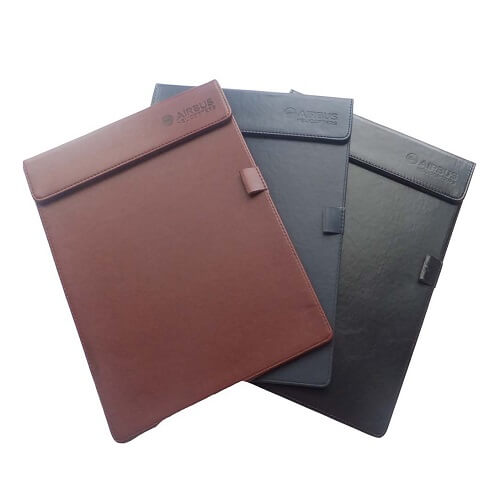
Thickness is what gets quoted. A thin greyboard around 1.5mm is common on slim bill pads and is fine for a docket signed flat on a table. Move up towards 2.5–3mm and the panel stops flexing meaningfully in the hand. A clipboard-format pad with a solid panel behaves differently again — it is rigid regardless, which is why it is the right answer at a point of sale.
Span is the part that gets forgotten. A board deflects as a function of its unsupported width, so the same board that feels solid on a compact cheque-sized pad feels flimsy on an A4 folio. If you are moving up in format, you must move up in board — a wider pad on the same board is a softer pad, every time.
The one-minute deflection test
Hold the sample open, supported only at two opposite edges, with nothing underneath the middle. Press the centre of the writing panel with your thumb using about the pressure you would use to sign. Then look along the surface at eye level.
If you can see the panel dish under your thumb, a guest signing while holding the pad in mid-air will feel it. If it stays visually flat, the board is doing its job. Do this before you look at the colour, the deboss or anything else — it is the fastest way to disqualify a sample.
The seam that ruins the signature
Now the detail that costs nothing to get right and cannot be fixed afterwards. Modern dockets are thin. A thermal receipt is thinner than office paper, and thin paper telegraphs everything beneath it. Anything raised on the lining — a stitched seam, the top edge of a card pocket, a folded-over hem, the ridge where the lining meets the gusset — will show up as a ghost line, and if it happens to run under the signature line, the pen jumps as it crosses.
So map it. Take the docket you actually issue, lay it on the sample exactly as a guest would receive it, and mark where the signature line falls. Then run your fingertip across that zone with your eyes closed. If you feel anything, move it — the pocket goes lower, the seam moves outboard, the card slots go on the opposite panel. This is a ten-second check that decides whether hundreds of signatures a month are clean or scratchy.
The lining texture matters too, in the opposite direction from what most people expect. A heavily pebbled or embossed lining under a thin thermal docket produces a faint stippled texture through the writing line — it looks like the pen is failing. A smooth, matte lining is the right surface. Save the texture for the outside, where it is seen rather than written on.
Clip tension, and where the clip sits
On a POS-style signing clipboard, the clip is the second engineering decision. Tension is a genuine trade-off, not a “stronger is better” setting.
Too tight, and a thermal docket creases or tears when it is pulled out; staff learn to open the clip with two hands, which defeats the point of the format. Too loose, and the docket creeps as the guest writes, which produces exactly the same wobbly line a flexible board does. The workable setting is one where a single docket is held firmly enough to resist a sideways drag from the pen, but can be pulled straight out with one hand without deforming.
Placement is the other half. A clip along the top edge is standard, but on a short docket — a card slip or a narrow thermal receipt — the signature line can end up close to the clip, which forces the writing hand up against hard metal. If your docket is short, either move the clip to the side edge or specify a longer backing panel so the docket sits lower than the clip. The clip also has to survive being opened continuously: a spring clip with a riveted plate lasts; a light spring in a plastic housing gets sloppy, and a sloppy clip is a loose docket.
One hand, standing up
Almost every specification is drawn up by someone sitting at a desk with the pad flat in front of them. Almost every real use is one-handed and vertical: a staff member holds the pad out, and the guest signs against it in mid-air, or takes it and balances it on a forearm.
Three things follow. First, weight and balance: a pad heavy enough to feel substantial is fine on a table and tiring held out at arm’s length through a service period, so weight belongs in the fine-dining brief and not in the counter brief. Second, the cover must stay where it is put — a soft cover with no closure flops back over the writing panel while the guest is mid-signature, which is why an elastic closure, a magnetic catch or a hard hinge earns its place. Third, there has to be somewhere to hold it: a clear margin down one edge, free of the pen, the clip and the card pocket, so a thumb can sit there without pinning the docket. Retention hardware competes for exactly that margin, which is why the pen decision and the board decision have to be taken together — the pen retention options that survive a busy counter each occupy a different part of the pad.
The signing-surface specification, by room
| Where it is signed | Board | Padding | Docket held by | Watch out for |
|---|---|---|---|---|
| Seated, on the table (restaurant) | Standard greyboard is adequate | Outer cover only | Slip pocket or corner band | Pocket ridge under the signature line |
| Standing, at a POS counter | Rigid panel — clipboard format | None on the writing face | Spring clip, riveted | Clip too close to a short docket |
| Held out, at a front desk | Thicker board, moderate format | Outer cover only | Elastic corner or light clip | Cover flopping shut mid-signature |
| Contracts, seated (office, showroom) | Heaviest board — wide span | Outer cover only | Nothing — loose documents | Board flex across the wider format |
| Guest book, standing at an easel or table | Rigid — supports a page block | Outer cover only | Bound or corded block | Spine ridge under the first entries |
Local tip: in a heavily air-conditioned dining room the thermal docket comes out of the printer warm and goes cold on the pad within a minute. Cold thermal paper is stiffer and slightly curled, and a curled docket lifts off a smooth lining just enough to move under the pen. If your dockets curl, ask for a slip pocket or a corner band rather than relying on the paper lying flat — it is not going to.
Send the docket, not the dimensions
The single most useful thing a buyer can send us is not a measurement. It is one real docket from the printer that will be used — the thermal slip, the card receipt, the registration form — plus a one-line note on how it is presented: flat on a table, held out at a counter, or handed over. From those two pieces of information the board, the padding placement, the lining, the retention method and the format follow almost automatically, and the mockup that comes back is answering the right question. Once the mechanics are settled, the remaining decisions are about how the object reads in the room, which is a different question covered in presentation across a hotel, a restaurant and a showroom.
For planning: minimum order is from 300 pcs per design, production takes 21–45 days after artwork approval depending on quantity, and shipping adds roughly 15 days nationwide. Express production in 10 working days is available on limited styles and quantities. A change of board or a moved pocket is a tooling and construction change rather than an artwork change, so it needs to be settled at sample stage — not after approval.
Signing surface questions we get asked
Is a thicker signature pad always better?
No — thicker usually means more padding, and padding is what makes a pad write badly. What you want is a stiffer board with a thin, firm writing face. A slim pad on a good board outperforms a plump pad on a soft one at the only moment that matters.
Can one pad serve both the dining room and the counter?
It can, but something gets compromised. The counter wants rigidity, a clip and a tethered pen; the dining room wants weight, softness in the hand and no visible hardware. Where a group runs both, the usual answer is one material, one logo treatment and two constructions — the set still reads as one family, and each version behaves properly in its own room.
Our signatures smudge. Is that the surface?
Usually it is the combination of a wet-writing ink and a coated docket that does not absorb. If the paper is fixed, the ink has to change; if the ink is fixed, the paper has to. What the pad can contribute is a firm, flat surface so the signature is written once at normal speed rather than laboured over — slow, heavy signing is what turns a slightly slow-drying ink into a smear.
What is the signature pad minimum order, and can we see a sample first?
Minimum order is from 300 pcs per design. We would rather you ran the deflection and docket checks on a physical sample before approving anything, because board and construction are the two things a digital mockup genuinely cannot show. Quotations are issued with an SST invoice, and we supply government and statutory buyers through ePerolehan.
Post us one docket and we will build the pad around it
Tell us what gets signed, where the guest stands and what the docket is printed on. We will come back with a construction specification and a free digital mockup, usually within one business day. Request a free mockup for your signing pad and we will confirm the board and the writing face before anything is made.
Aquaholic Gifts Malaysia · AS80, Jalan Hang Tuah 4, Taman Salak Selatan, 57100 Kuala Lumpur